
369 lines
12 KiB
Markdown
369 lines
12 KiB
Markdown
# node-notifier [![NPM version][npm-image]][npm-url] [![Build Status][travis-image]][travis-url] [![Dependency Status][depstat-image]][depstat-url]
|
|
|
|
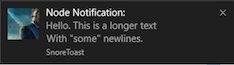
A Node.js module for sending cross platform system notifications. Using
|
|
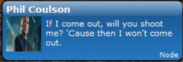
Notification Center for Mac, notify-osd/libnotify-bin for Linux, Toasters for
|
|
Windows 8/10, or taskbar Balloons for earlier Windows versions. If none of
|
|
these requirements are met, Growl is used.
|
|
|
|

|
|
|
|
|
|
|
|
## Quick Usage
|
|
|
|
Show a native notification on Mac, Windows, Linux:
|
|
|
|
```javascript
|
|
const notifier = require('node-notifier');
|
|
// String
|
|
notifier.notify('Message');
|
|
|
|
// Object
|
|
notifier.notify({
|
|
'title': 'My notification',
|
|
'message': 'Hello, there!'
|
|
});
|
|
```
|
|
|
|
## Requirements
|
|
- **Mac OS X**: >= 10.8 or Growl if earlier.
|
|
- **Linux**: `notify-osd` or `libnotify-bin` installed (Ubuntu should have this by default)
|
|
- **Windows**: >= 8, task bar balloon if earlier or Growl if that is installed.
|
|
- **General Fallback**: Growl
|
|
|
|
Growl takes precedence over Windows balloons.
|
|
|
|
See [documentation and flow chart for reporter choice](./DECISION_FLOW.md)
|
|
|
|
## Install
|
|
```
|
|
$ npm install --save node-notifier
|
|
```
|
|
|
|
## Cross-Platform Advanced Usage
|
|
|
|
Standard usage, with cross-platform fallbacks as defined in the
|
|
[reporter flow chart](./DECISION_FLOW.md). All of the options
|
|
below will work in a way or another on all platforms.
|
|
|
|
```javascript
|
|
const notifier = require('node-notifier');
|
|
const path = require('path');
|
|
|
|
notifier.notify({
|
|
title: 'My awesome title',
|
|
message: 'Hello from node, Mr. User!',
|
|
icon: path.join(__dirname, 'coulson.jpg'), // Absolute path (doesn't work on balloons)
|
|
sound: true, // Only Notification Center or Windows Toasters
|
|
wait: true // Wait with callback, until user action is taken against notification
|
|
}, function (err, response) {
|
|
// Response is response from notification
|
|
});
|
|
|
|
notifier.on('click', function (notifierObject, options) {
|
|
// Triggers if `wait: true` and user clicks notification
|
|
});
|
|
|
|
notifier.on('timeout', function (notifierObject, options) {
|
|
// Triggers if `wait: true` and notification closes
|
|
});
|
|
```
|
|
|
|
You can also specify what reporter you want to use if you
|
|
want to customize it or have more specific options per system.
|
|
See documentation for each reporter below.
|
|
|
|
Example:
|
|
```javascript
|
|
const NotificationCenter = require('node-notifier/notifiers/notificationcenter');
|
|
new NotificationCenter(options).notify();
|
|
|
|
const NotifySend = require('node-notifier/notifiers/notifysend');
|
|
new NotifySend(options).notify();
|
|
|
|
const WindowsToaster = require('node-notifier/notifiers/toaster');
|
|
new WindowsToaster(options).notify();
|
|
|
|
const Growl = require('node-notifier/notifiers/growl');
|
|
new Growl(options).notify();
|
|
|
|
const WindowsBalloon = require('node-notifier/notifiers/balloon');
|
|
new WindowsBalloon(options).notify();
|
|
|
|
```
|
|
|
|
Or if you are using several (or you are lazy):
|
|
(note: technically, this takes longer to require)
|
|
|
|
```javascript
|
|
const nn = require('node-notifier');
|
|
|
|
new nn.NotificationCenter(options).notify();
|
|
new nn.NotifySend(options).notify();
|
|
new nn.WindowsToaster(options).notify(options);
|
|
new nn.WindowsBalloon(options).notify(options);
|
|
new nn.Growl(options).notify(options);
|
|
```
|
|
|
|
## Contents
|
|
|
|
* [Notification Center documentation](#usage-notificationcenter)
|
|
* [Windows Toaster documentation](#usage-windowstoaster)
|
|
* [Windows Balloon documentation](#usage-windowsballoon)
|
|
* [Growl documentation](#usage-growl)
|
|
* [Notify-send documentation](#usage-notifysend)
|
|
|
|
|
|
### Usage NotificationCenter
|
|
|
|
Same usage and parameter setup as [terminal-notifier](https://github.com/alloy/terminal-notifier).
|
|
|
|
Native Notification Center requires Mac OS X version 10.8 or higher. If you have
|
|
an earlier version, Growl will be the fallback. If Growl isn't installed, an
|
|
error will be returned in the callback.
|
|
|
|
|
|
#### Example
|
|
|
|
Wrapping around [terminal-notifier](https://github.com/alloy/terminal-notifier), you can
|
|
do all terminal-notifier can do through properties to the `notify` method. E.g.
|
|
if `terminal-notifier` says `-message`, you can do `{message: 'Foo'}`, or
|
|
if `terminal-notifier` says `-list ALL`, you can do `{list: 'ALL'}`. Notification
|
|
is the primary focus for this module, so listing and activating do work,
|
|
but isn't documented.
|
|
|
|
### All notification options with their defaults:
|
|
|
|
```javascript
|
|
const NotificationCenter = require('node-notifier').NotificationCenter;
|
|
|
|
var notifier = new NotificationCenter({
|
|
withFallback: false, // Use Growl Fallback if <= 10.8
|
|
customPath: void 0 // Relative path if you want to use your fork of terminal-notifier
|
|
});
|
|
|
|
notifier.notify({
|
|
'title': void 0,
|
|
'subtitle': void 0,
|
|
'message': void 0,
|
|
'sound': false, // Case Sensitive string for location of sound file, or use one of OS X's native sounds (see below)
|
|
'icon': 'Terminal Icon', // Absolute Path to Triggering Icon
|
|
'contentImage': void 0, // Absolute Path to Attached Image (Content Image)
|
|
'open': void 0, // URL to open on Click
|
|
'wait': false // Wait for User Action against Notification
|
|
}, function(error, response) {
|
|
console.log(response);
|
|
});
|
|
```
|
|
|
|
**For Mac OS notifications, icon and contentImage requires OS X 10.9.**
|
|
|
|
Sound can be one of these: `Basso`, `Blow`, `Bottle`, `Frog`, `Funk`, `Glass`,
|
|
`Hero`, `Morse`, `Ping`, `Pop`, `Purr`, `Sosumi`, `Submarine`, `Tink`.
|
|
If sound is simply `true`, `Bottle` is used.
|
|
|
|
See [specific Notification Center example](./example/advanced.js).
|
|
|
|
### Usage WindowsToaster
|
|
|
|
**Note:** There are some limitations for images in native Windows 8 notifications:
|
|
The image must be a PNG image, and cannot be over 1024x1024 px, or over over 200Kb.
|
|
You also need to specify the image by using an absolute path. These limitations are
|
|
due to the Toast notification system. A good tip is to use something like
|
|
`path.join` or `path.delimiter` to have cross-platform pathing.
|
|
|
|
**Windows 10 Note:** You might have to activate banner notification for the toast to show.
|
|
|
|
From [mikaelbr/gulp-notify#90 (comment)](https://github.com/mikaelbr/gulp-notify/issues/90#issuecomment-129333034)
|
|
> You can make it work by going to System > Notifications & Actions. The 'toast' app needs to have Banners enabled. (You can activate banners by clicking on the 'toast' app and setting the 'Show notification banners' to On)
|
|
|
|
[toaster](https://github.com/nels-o/toaster) is used to get native Windows Toasts!
|
|
|
|
```javascript
|
|
const WindowsToaster = require('node-notifier').WindowsToaster;
|
|
|
|
var notifier = new WindowsToaster({
|
|
withFallback: false, // Fallback to Growl or Balloons?
|
|
customPath: void 0 // Relative path if you want to use your fork of toast.exe
|
|
});
|
|
|
|
notifier.notify({
|
|
title: void 0,
|
|
message: void 0,
|
|
icon: void 0, // Absolute path to Icon
|
|
sound: false, // true | false.
|
|
wait: false, // Wait for User Action against Notification
|
|
}, function(error, response) {
|
|
console.log(response);
|
|
});
|
|
```
|
|
|
|
### Usage Growl
|
|
|
|
```javascript
|
|
const Growl = require('node-notifier').Growl;
|
|
|
|
var notifier = new Growl({
|
|
name: 'Growl Name Used', // Defaults as 'Node'
|
|
host: 'localhost',
|
|
port: 23053
|
|
});
|
|
|
|
notifier.notify({
|
|
title: 'Foo',
|
|
message: 'Hello World',
|
|
icon: fs.readFileSync(__dirname + "/coulson.jpg"),
|
|
wait: false, // Wait for User Action against Notification
|
|
|
|
// and other growl options like sticky etc.
|
|
sticky: false,
|
|
label: void 0,
|
|
priority: void 0
|
|
});
|
|
```
|
|
|
|
See more information about using
|
|
[growly](https://github.com/theabraham/growly/).
|
|
|
|
### Usage WindowsBalloon
|
|
|
|
For earlier Windows versions, the taskbar balloons are used (unless
|
|
fallback is activated and Growl is running). For balloons, a great
|
|
project called [notifu](http://www.paralint.com/projects/notifu/) is used.
|
|
|
|
```javascript
|
|
const WindowsBalloon = require('node-notifier').WindowsBalloon;
|
|
|
|
var notifier = new WindowsBalloon({
|
|
withFallback: false, // Try Windows Toast and Growl first?
|
|
customPath: void 0 // Relative path if you want to use your fork of notifu
|
|
});
|
|
|
|
notifier.notify({
|
|
title: void 0,
|
|
message: void 0,
|
|
sound: false, // true | false.
|
|
time: 5000, // How long to show balloon in ms
|
|
wait: false, // Wait for User Action against Notification
|
|
type: 'info' // The notification type : info | warn | error
|
|
}, function(error, response) {
|
|
console.log(response);
|
|
});
|
|
```
|
|
|
|
See full usage on the [project homepage:
|
|
notifu](http://www.paralint.com/projects/notifu/).
|
|
|
|
### Usage NotifySend
|
|
|
|
Note: notify-send doesn't support the wait flag.
|
|
|
|
```javascript
|
|
const NotifySend = require('node-notifier').NotifySend;
|
|
|
|
var notifier = new NotifySend();
|
|
|
|
notifier.notify({
|
|
title: 'Foo',
|
|
message: 'Hello World',
|
|
icon: __dirname + "/coulson.jpg",
|
|
|
|
// .. and other notify-send flags:
|
|
urgency: void 0,
|
|
time: void 0,
|
|
category: void 0,
|
|
hint: void 0,
|
|
});
|
|
```
|
|
|
|
See flags and options [on the man pages](http://manpages.ubuntu.com/manpages/gutsy/man1/notify-send.1.html)
|
|
|
|
## CLI
|
|
|
|
You can also use node-notifier as a CLI (as of `v4.2.0`).
|
|
|
|
```shell
|
|
$ notify -h
|
|
|
|
# notify
|
|
## Options
|
|
* --help (alias -h)
|
|
* --title (alias -t)
|
|
* --subtitle (alias -st)
|
|
* --message (alias -m)
|
|
* --icon (alias -i)
|
|
* --sound (alias -s)
|
|
* --open (alias -o)
|
|
|
|
## Example
|
|
|
|
$ notify -t "Hello" -m "My Message" -s --open http://github.com
|
|
$ notify -t "Agent Coulson" --icon https://raw.githubusercontent.com/mikaelbr/node-notifier/master/example/coulson.jpg -m "Well, that's new. "
|
|
$ notify -m "My Message" -s Glass
|
|
$ echo "My Message" | notify -t "Hello"
|
|
```
|
|
|
|
You can also pass message in as `stdin`:
|
|
|
|
```js
|
|
➜ echo "Message" | notify
|
|
|
|
# Works with existing arguments
|
|
➜ echo "Message" | notify -t "My Title"
|
|
➜ echo "Some message" | notify -t "My Title" -s
|
|
```
|
|
|
|
## Thanks to OSS
|
|
|
|
`node-notifier` is made possible through Open Source Software. A very special thanks to all the modules `node-notifier` uses.
|
|
* [terminal-notifier](https://github.com/alloy/terminal-notifier)
|
|
* [toaster](https://github.com/nels-o/toaster)
|
|
* [notifu](http://www.paralint.com/projects/notifu/)
|
|
* [growly](https://github.com/theabraham/growly/)
|
|
|
|
[![NPM downloads][npm-downloads]][npm-url]
|
|
|
|
## Common Issues
|
|
|
|
### Use inside tmux session
|
|
|
|
When using node-notifier within a tmux session, it can cause a hang in the system. This can be solved by following the steps described in this comment: https://github.com/julienXX/terminal-notifier/issues/115#issuecomment-104214742
|
|
|
|
See more info here: https://github.com/mikaelbr/node-notifier/issues/61#issuecomment-163560801
|
|
|
|
|
|
### Within Electron Packaging
|
|
|
|
If packaging your Electron app as an `asar`, you will find node-notifier will fail to load. Due to the way asar works, you cannot execute a binary from within an asar. As a simple solution, when packaging the app into an asar please make sure you `--unpack` the vendor folder of node-notifier, so the module still has access to the notification binaries. To do this, you can do so by using the following command:
|
|
|
|
```bash
|
|
asar pack . app.asar --unpack "./node_modules/node-notifier/vendor/**"
|
|
```
|
|
|
|
|
|
### Using Webpack
|
|
|
|
When using node-notifier inside of webpack, you must add the following snippet to your `webpack.config.js`. The reason this is required, is because node-notifier loads the notifiers from a binary, and so a relative file path is needed. When webpack compiles the modules, it supresses file directories, causing node-notifier to error on certain platforms. To fix/workaround this, you must tell webpack to keep the relative file directories, by doing so, append the following code to your `webpack.config.js`
|
|
|
|
```javascript
|
|
node: {
|
|
__filename: true,
|
|
__dirname: true
|
|
}
|
|
```
|
|
|
|
|
|
## License
|
|
|
|
[MIT License](http://en.wikipedia.org/wiki/MIT_License)
|
|
|
|
[npm-url]: https://npmjs.org/package/node-notifier
|
|
[npm-image]: http://img.shields.io/npm/v/node-notifier.svg?style=flat
|
|
[npm-downloads]: http://img.shields.io/npm/dm/node-notifier.svg?style=flat
|
|
|
|
[travis-url]: http://travis-ci.org/mikaelbr/node-notifier
|
|
[travis-image]: http://img.shields.io/travis/mikaelbr/node-notifier.svg?style=flat
|
|
|
|
[depstat-url]: https://gemnasium.com/mikaelbr/node-notifier
|
|
[depstat-image]: http://img.shields.io/gemnasium/mikaelbr/node-notifier.svg?style=flat
|